ComputerScienceExpert
$18/per page/
Using Java you will build a list of CreditCards, then use the Comparable and Comparator interfaces to sort the list in different ways.
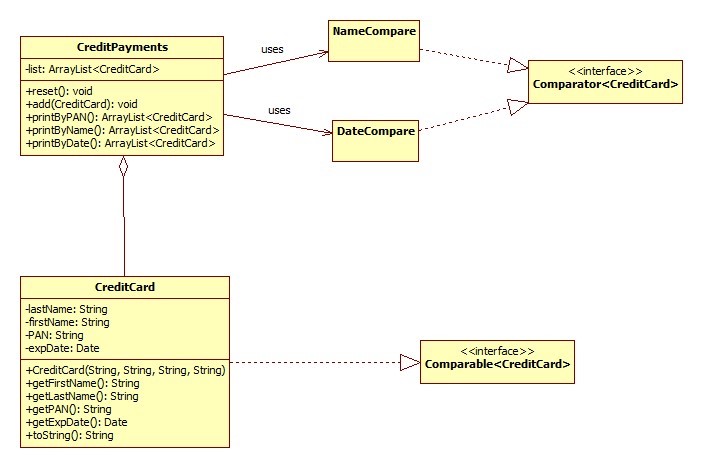
To start, implement the following UML – ( the uml_1 attachment )
Notes:
CreditCard. This class will model the key date elements of a credit card as shown. Note that in addition to the getter methods, there is a toString() method. This method will print our the last name, first name, PAN, and expiration date in a nice, format. Use the String.format() method to print this data in fixed fields.
Use the SimpleDateFormat class to convert a string to a java Date, and vice versa. You can look up this technique on the internet. The data format is "MM/yy"
CreditPayments. This class will serve as a container for credit cards and will be used to print the cards in different order.
The add() methods adds a CreditCard object to the array list.
The reset() methods clears the array list.
The printByXX methods will:
use the Collections.sort() method to order the arraylist prior to printing
use an foreach loop to go through the ArrayList and print each CreditCard. Because you overrode the toString() method in the Credit Card class, you can just pass in the credit card instance to the System.out.println() method, and the toString() method will be called automatically for you.
return a sorted ArrayList of CreditCards according to the method name
The printByPAN will print the credit cards in the list using the natural ordering as implied by the Comparable interface. For us, the natural ordering will be by PAN.
The printByName will print the credit cards in the list by last name, then first name. The Collections.sort() method is overloaded, and there's one that accepts a Comparator. You'll pass in an instance of your NameCompare class to this sort method so that your list will be sorted as indicated by the NameCompare class.
The printByDate will print the credit cards in the list byDate. Again, use the overloaded sort() method that takes a Comparator, and pass in an instance of your DateCompare class.
NameCompare. This class implements the Comparator interface as shown and will be used to order the credit cards by last name, then first name. To do this correctly in the compare() method, you will need to first check if the last names are the same, and if so, then return the comparison of the first names. If not, then return the comparison of the last names.
DateCompare. This class implements the Comparator interface as shown and will be used to order the credit cards by the expiration date. This is accomplished by taking advantage of the fact that the date object has a compareTo() method. You can simply return the result of the Date's compareTo method.
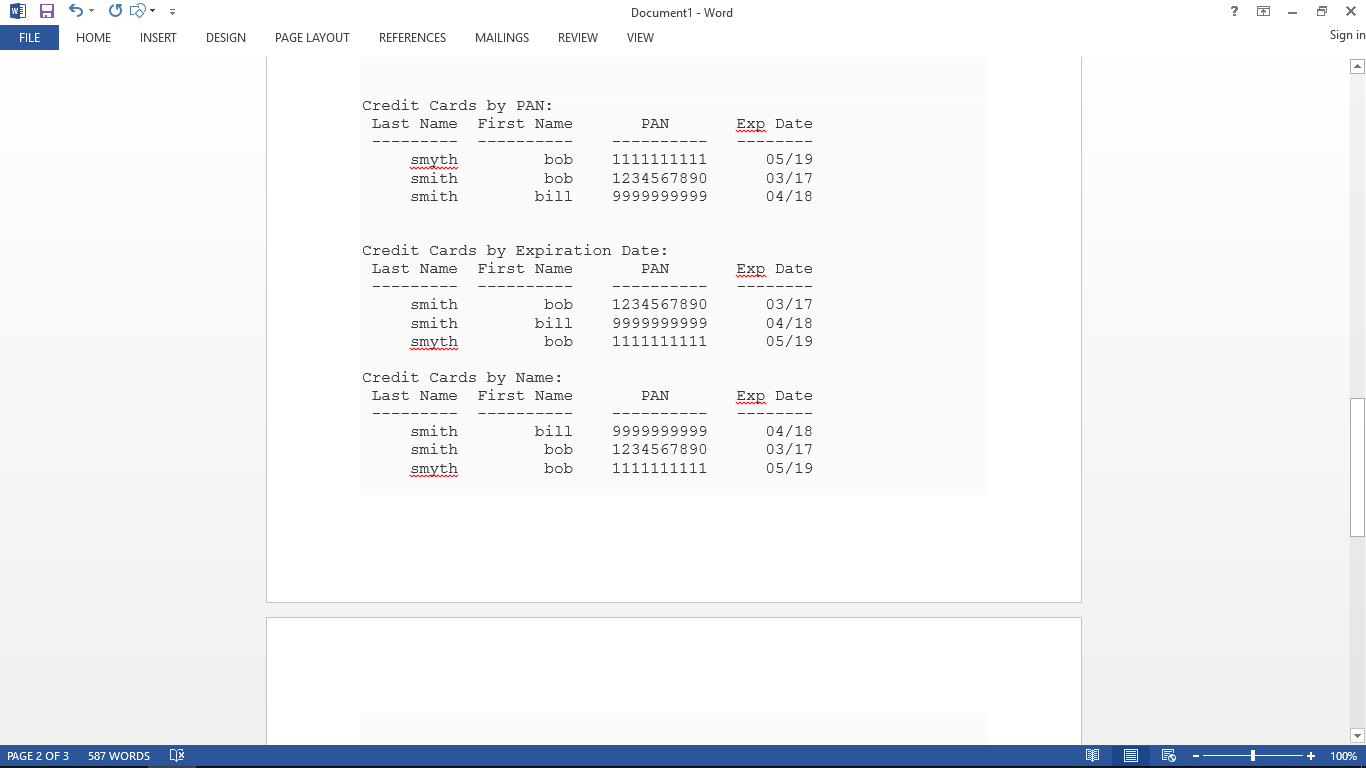
The output after calling the printByXXX methods should look as close a possible to the following – (results_1 attachment)
Follow all the steps, put comments next to coding, and Screen shot the output of the results.
Attachments: