ComputerScienceExpert
$18/per page/
Assignment Overview
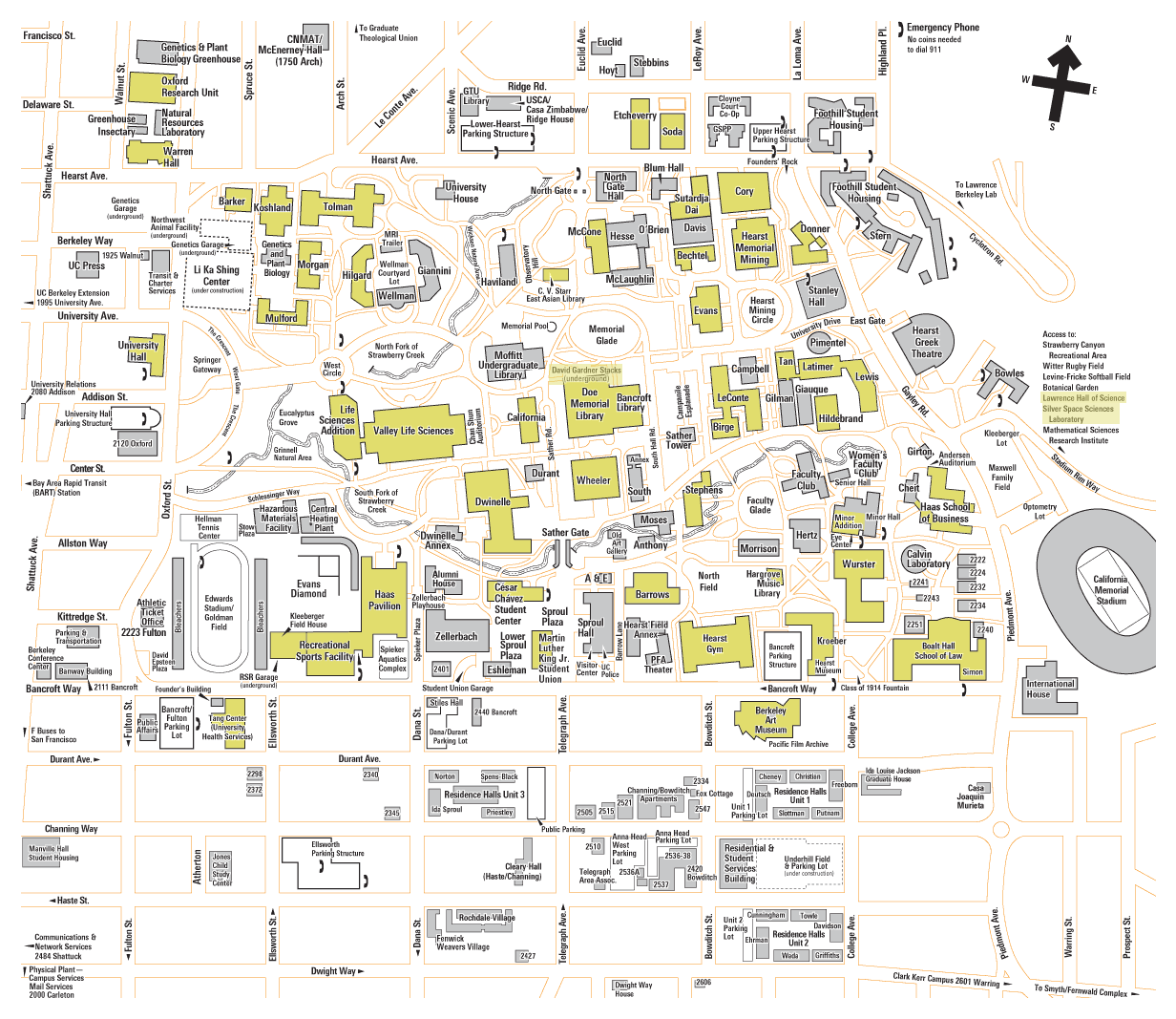
You will be designing an on-campus internetwork for a new large university that has been proposed. The University will have dozens of buildings, all within a very close proximity to each other. Use the University of California, Berkeley Campus as a model for your design.
You can find their campus map http://berkeley.openbms.org/site-media/campusmap.png
Note: Your design does not need to include any buildings south of Durant Ave.
Your diagram needs to include several hub sites, interconnections between the hubs sites in a partial mesh network, full-mesh or ring network design for redundancy. Each building needs to have three network connections (minimum) to the hub site – one for wired networks, one for wireless networks and a third for the Voice Over IP telephone system.
Each “named” building on the map needs to be included in your network design. Larger buildings will need twice the network capacity (six connections instead of three).
Select Your Network Hub Sites
Your network hub sites will need to be selected from the list of named buildings. Choose hub sites from the larger buildings rather than the smaller ones. Diagram your fiber network routes between a hub site and each of the buildings it serves. Each of your named buildings will connect to ONE and only one hub site. You will need to pick how many hub sites you need and distribute the load of the number of buildings served between hub sites. Because the cost of installation of the fiber between buildings is high (underground construction), you want to keep the distance between the buildings and the hub sites to a minimum. Select between four (4) and six (6) hub sites to complete this design.
Interconnect your Network Hub Sites
The network hub sites need to be interconnected to provide redundancy. Choose between a Full Mesh, Partial Mesh and Ring topology. Diagram your inter-hub site network both on the map and with a logical network diagram. Provide a diagram for the routing of the physical fiber connections across the campus from one hub site to the ones that it is connected to. Make sure to avoid major obstacles like major roads, bodies of water, etc.
Size your Network Hub Sites
Each network hub serves many nearby buildings. How many router ports do you need for the data networks (wired and wireless) and for the telephone network (VoIP). The University wants to keep its telephone network completely separated and not connected to the data network at all.
Each Network Hub Site will have at least two routers. One router serves the data network and the other serves the telephone/VoIP network. Determine how many router ports for each hub site for each network are required, as determined by the number of buildings.
Network Documentation for a Typical Building
Document a typical building’s network. Remember to separate the data network from the voice network. Show the fiber connection(s) to the hub site. Connect the fiber connection to a switch. Show multiple end-user devices such as computers, laptops, VoIP phones, tablets and servers. You don’t need to show a fully-developed network at the typical building, just an example.
*Once you have completed the diagram in Visio, you must convert it to Adobe PDF for submission!
What to Turn In
Turn in your Visio Diagrams (created in Visio) in PDF format that includes your entire network.
You need three sub-diagrams:
A geographic map with the hub sites selected and inter-hub site network.
A logical diagram of the hub sites and how they are inter-connected with your selected topology.
A typical building network.
You also need to turn in a .doc/.docx file that explains your network diagram elements. Include snapshots from your network diagram in your .doc/.docx file – and annotate your diagram snapshots to better help your explanation of your network.
Attachments: