ComputerScienceExpert
$18/per page/
I really need some help with completing this project, anything would help
Project Overview
Over the next five weeks, you will be creating a basic network diagram and setting up basic security measures for protecting a simple network. You will learn what the devices do and how they perform their basic functions.
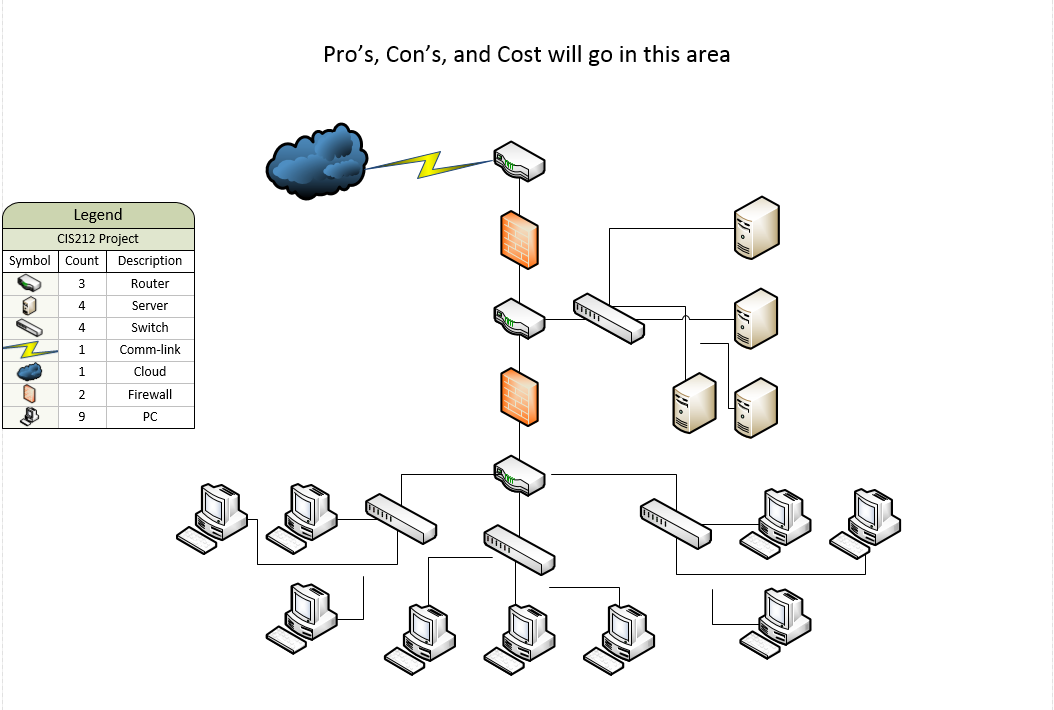
Don't worry—the overall diagram will be given to you, but you will need to use what you learned during the week to help you fill in any missing information. This project will require use of diagramming software, such as Visio, to help you complete your tasks.
Each week, you will be asked to submit a portion of this project. You will be given certain requirements each week that are specific to what you've been learning.
⦁ Each week, you will be asked to submit a portion of this project. You will be given certain requirements each week that are specific to what you've been learning.
⦁ Week 1: Part 1
⦁ In the Project Overview, you will be creating the basic layout of your network and setting up the locations where your devices and network IDs will be placed.
⦁ Directions: Before you begin your tasks for this week, read the article How to Secure Your Small to Medium Sized Microsoft Based Network: A Generic Case Study from the SANS Institute. This article can be obtained by conducting a search of the article’s title on sans.org
⦁ This week we are setting up the basic shell of the network diagram in Visio. Your tasks for this week are to:
⦁ Using the linked image below, create the initial build of the diagram using software like Visio (available via XenDesktop).
⦁ Download the ⦁ Initial Build of Diagram.
⦁ Label the components that are listed in your diagram. Describe why the components are placed in that specific location.
⦁ Label network IDs.
⦁ In your diagram, insert a legend. Since everyone in this course may be using different graphics or visuals to represent their components, a legend will help the reader make better sense of the information in your diagram.
⦁ Create a space at the top of your diagram where you will be able to identify the cost, pros, and cons of your components in the upcoming units.
⦁ At the bottom of your diagram, you should list any sources you used to help with your research in ⦁ APA format (Links to an external site.)
Attachments: