ComputerScienceExpert
$18/per page/
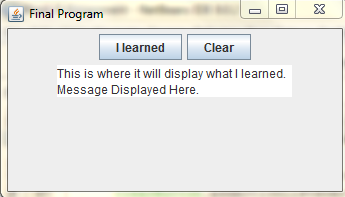
Create a Graphical User Interface that has two buttons and a textArea (See Examples 12.3 and Example 12.4).
Create a String array to store the following messages (Enter your name where it says YourName).
"Congratulations YourName!nYou completed the Java class. nYou learned to write Java programs with commonly usedn control structures."
"Congratulations YourName!nYou completed the Java class. nYou learned to create a Java program using classes and methods."
"Congratulations YourName!nYou completed the Java class. nYou learned to create an Applet to draw shapes using graphics nmethods."
"Congratulations YourName!nYou completed the Java class. nYou learned to develop Java program using arrays."
"Congratulations YourName!nYou completed the Java class. nYou learned to write a Java program using sorting techniques."
"Congratulations YourName!nYou completed the Java class. nYou learned to code a Java program where parameters are passed."
"Congratulations YourName!nYou completed the Java class. nYou learned to identify and correct program errors."
To determine which message is displayed, you will use a random number between 0 and 6 (see page 125 or Example 3.8).
The random number will determine the index of the array message to display in the JTextArea.
When the clear button is pressed, the JTextArea message is equal to “This is where it will display what I learned. nMessage Displayed Here.“
The layout style will be a FlowLayout. Set the size of display screen to 400 by 200 [setSize(400, 200);]
Make a screenshot of the output and include it as an attachment to the Week 8 Assignment. Also, include the program code in a text file to run on another computer. Comment the code to receive full credit (see page 45).
Attachments: