ComputerScienceExpert
$18/per page/
his week, you’ll be constructing a State Machine. A State Machine is a powerful programming tool that lets you control the flow of information based on different states. By keeping track of what state the system is in, and limiting what actions it can take in each state, it makes it easier to keep track of what’s happening in your system, especially if something goes wrong.
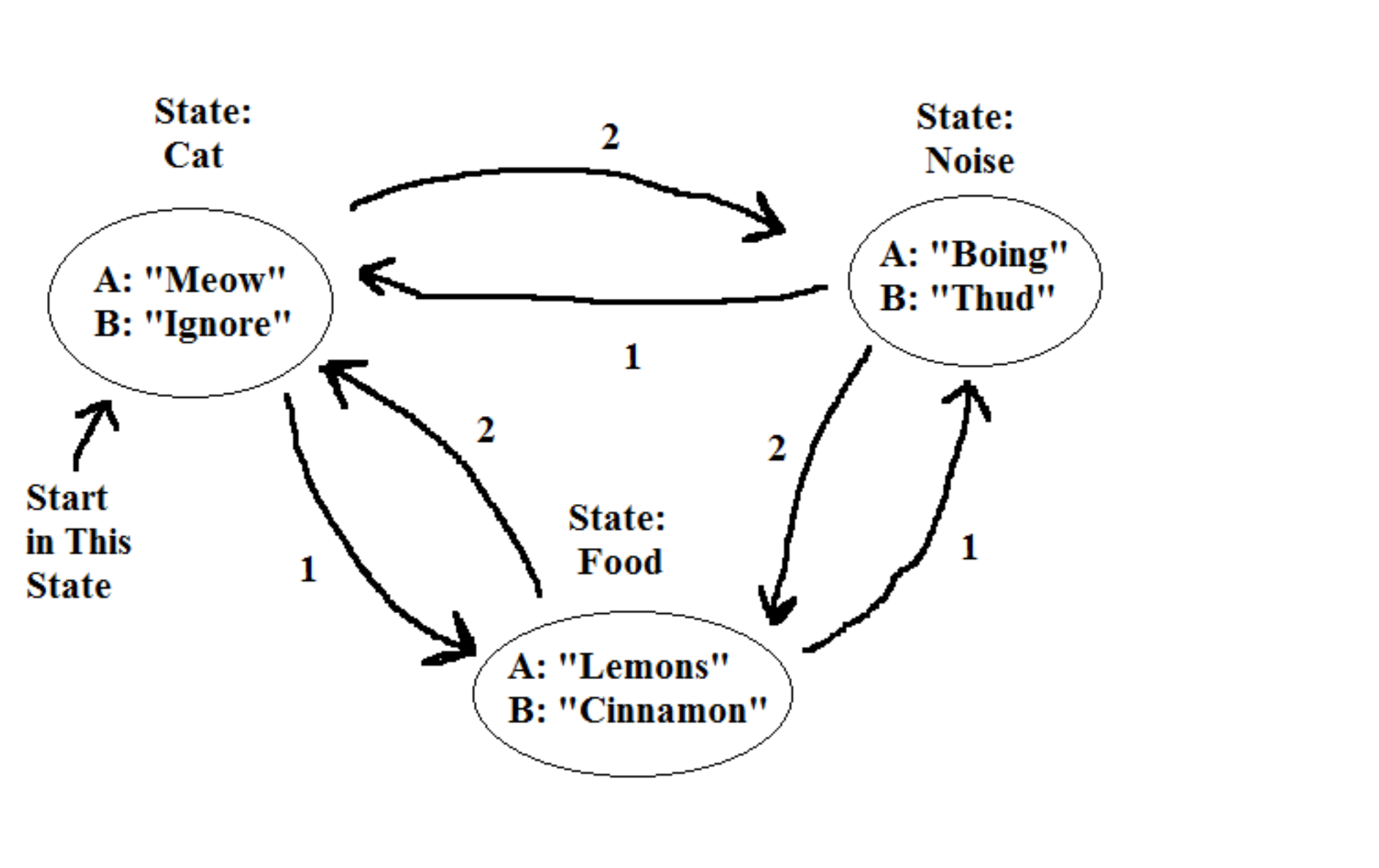
In the attached image, you’ll see a State Machine comprised of three different states, Cat, Noise, and Food, and a number of transitions between each state, arrows labeled with 1 or 2. In addition to the transitions, there are actions in each state, various words with A or B next to them.
For this program, each state has the ability to print one of two messages. For example, Cat can either print “Meow” or it can print “Ignore”. But it will only do this based on what information it’s given. In addition to printing one of those two messages, it can also change into a different state, such as Noise or Food, if it’s given another piece of information.
YOUR ASSIGNMENT, build a code that, given a string for input, can start at the “Cat” state, and perform actions until you run out of information. You’ll be turning in your code as well as the output your program states.
As an example, you start in the state “Cat” and get the following string as input: “1A1B21B”
So step by step it will follow the instructions. First is a “1” which tells it to go to the “Food” state. The second instruction is an “A” which tells it to print the word “Lemons”. The third instruction is “1” which makes it go to the “Noise” state. While in the “Noise” state it reads the fourth instruction, “B”, and prints “Thud”. The fifth instruction, “2”, causes it to change states back to the “Food” state, where it reads the sixth instruction “1”, which causes it to immediately return to the “Noise” state, and then the final instruction, “B”, makes it print “Thud” again. At this point you’re out of instructions, so the program is done reading. Thus the output of that set of instructions would read as follows:
“Lemons”
“Thud”
“Thud”
You’ll be using the following five strings as input, which should each yield output similar to as seen above. You can use the example string above to test your State Machine.
( 1 ) – “BB2AAB1A”
( 2 ) – “11B2A2B1B”
( 3 ) – “A1BB1222A”
( 4 ) – “122A22AA1A”
( 5 ) – “AA2AA2A22B”
My suggestion is that you use an enumeration declaration to make the names for your classes, so it will be easier for you (and me) to read. Also, you’ll find a ‘switch’ statement to be particularly useful when building a State Machine.
Attachments: