ComputerScienceExpert
$18/per page/
I am trying making a walk-in and appointment scheduler using Java with Javaswing. Currently I have two classes (posted below) that got the simple GUI and the Walk-in queue to work.
WHAT NEED TO BE DONE ARE:
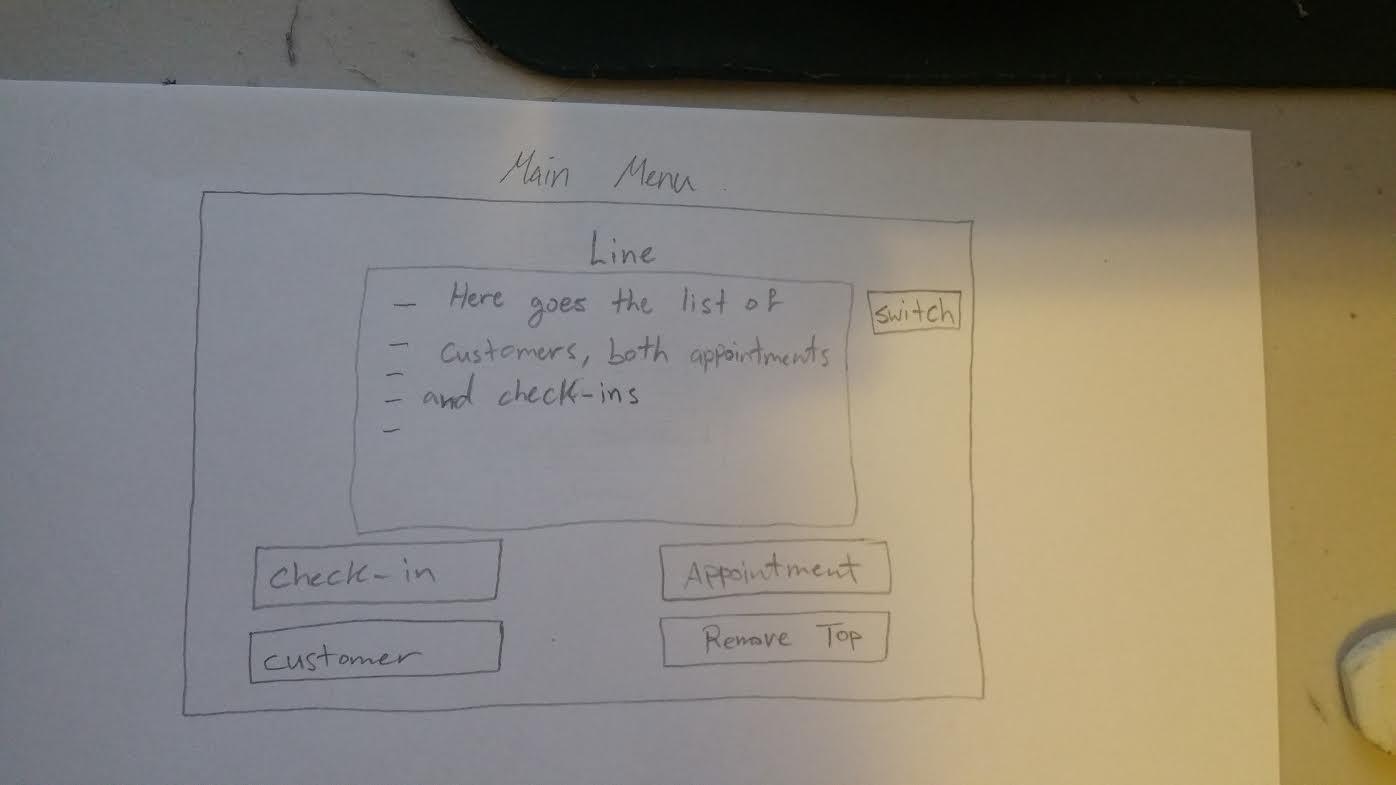
1) Modify the GUI main window looks as much like the "attach file picture" as possible
2) Add a button on the GUI called "Appointment" that add an appointment time to an available appontment slot from Monday-Sunday and 8am - 8p where each appointment is 30 minutes from each other. Make it similar to "Check-in" where we can add, remove, and display.
3) Add another button on the GUI called "Customer" that open to another GUI window (or something else) that implement Binary Search Tree for use of searching and editing customer info
4) Use Priority queue to priortize the appointment customers first than the walk-in customers
MODIFY THE CODES AS YOU LIKE!!!
//import the required classes
import java.awt.FlowLayout;
import java.awt.GridLayout;
import java.awt.event.ActionEvent;
import java.awt.event.ActionListener;
import java.text.SimpleDateFormat;
import java.util.Date;
import java.util.Iterator;
import java.util.LinkedList;
import java.util.Locale;
import java.util.Queue;
import javax.swing.JButton;
import javax.swing.JFrame;
import javax.swing.JLabel;
import javax.swing.JOptionPane;
import javax.swing.JPanel;
import javax.swing.JTextField;
//JFrame class that implements action listener interface
public class QueueScheduling extends JFrame implements ActionListener
{
//declare the components and variables
JPanel jpan, jpan1;
JLabel label1, label2, label3, label4;
JButton insert, remove, show, exit;
Queue queCustomer;
String name, startTime, endTime;
int id;
//constructor
public QueueScheduling()
{
//initialize the Component objects
queCustomer = new LinkedList();
jpan1 = new JPanel(new FlowLayout());
jpan = new JPanel(new GridLayout(3, 2));
label1 = new JLabel("New Check-In: ");
label2 = new JLabel("Remove Top Of Line: ");
label3 = new JLabel("Waiting Line: ");
insert = new JButton("Add");
remove = new JButton("Remove");
show = new JButton("Display");
//add the components to the panel
jpan.add(label1);
jpan.add(insert);
jpan.add(label2);
jpan.add(remove);
jpan.add(label3);
jpan.add(show);
//add the component panel to another panel
jpan1.add(new JLabel("CHECK-IN MENU"), JPanel.TOP_ALIGNMENT);
jpan1.add(jpan, JPanel.CENTER_ALIGNMENT);
//add the main panel
add(jpan1);
//add action listeners to the buttons
insert.addActionListener(this);
remove.addActionListener(this);
show.addActionListener(this);
}
// @Override actionPerformed method
public void actionPerformed(ActionEvent ae)
{
//if "Add" button is pressed prompt
//the information and add the CustomerNames
//object to the queue
if (insert == ae.getSource())
{
//create a panel containing labels and buttons
JPanel insertJPan = new JPanel(new GridLayout(2, 2));
JLabel jlAppTime = new JLabel("Appointment Time");
JTextField jtxappTime = new JTextField();
JLabel custName = new JLabel("Enter Customer Name: ");
JTextField jtxName = new JTextField();
//add the components to the panel
insertJPan.add(jlAppTime);
insertJPan.add(jtxappTime);
insertJPan.add(custName);
insertJPan.add(jtxName);
insertJPan.setVisible(true);
//add the panel into the JOptionPane
JOptionPane.showMessageDialog(null, insertJPan,
"Please enter the details ",
JOptionPane.INFORMATION_MESSAGE);
//get the values
id = Integer.parseInt(jtxappTime.getText());
name = jtxName.getText();
//get the time of creation
Date d = new Date();
startTime = new SimpleDateFormat("HH:mm:ss", Locale.ENGLISH).format(d);
//create the CustomerNames object
Customer customerInfo = new Customer(id, name, startTime);
//add object to the queue
queCustomer.add(customerInfo);
}
//if "Remove" button is pressed
else if (remove == ae.getSource())
{
//call the remove method of queue and
//store the returned object into
//CustomerNames object
Customer cName = queCustomer.remove();
//create a Date object
Date end = new Date();
//get the time format
endTime = new SimpleDateFormat("HH:mm:ss", Locale.ENGLISH).format(end);
//calculate the elapsed time
String elapse = getElapsedTime(cName.getTime(), endTime);
//display the time
JOptionPane.showMessageDialog(null, "Appointment: " + cName.getAppointment()
+ "nStart time: " + cName.getTime() + "End time: "
+ endTime + "nelapsed time: " + elapse);
}
//if "Display" button is pressed
else if (show == ae.getSource())
{
//create the header of the table
String str = "Appointment NAME TIME STARTnn";
//call the iterator of queCustomer
Iterator it = queCustomer.iterator();
//get all the items of the list
while (it.hasNext())
{
str += it.next() + "n";
}
//display the items
JOptionPane.showMessageDialog(null, str);
}
}
//calculation of elapse time
public static String getElapsedTime(String starting, String ending)
{
String startToken[] = starting.split(":");
String endToken[] = ending.split(":");
int hours = Math.abs(Integer.parseInt(startToken[0])- Integer.parseInt(endToken[0]));
int minutes = Math.abs(Integer.parseInt(startToken[1])- Integer.parseInt(endToken[1]));
int seconds = Math.abs(Integer.parseInt(startToken[2])- Integer.parseInt(endToken[2]));
return hours + ":" + minutes + ":" + seconds;
}
//main method
public static void main(String args[])
{
QueueScheduling queSchd = new QueueScheduling();
queSchd.setVisible(true);
queSchd.setSize(300, 200);
queSchd.setDefaultCloseOperation(JFrame.EXIT_ON_CLOSE);
queSchd.setTitle("Queue Waiting List GUI"); //Queue Interface Implementation
}
}
public class Customer
{
// declare the variables
int appointment;
String name;
String time;
// constructor
public Customer(int appointment, String name, String time)
{
this.appointment = appointment;
this.name = name;
this.time = time;
}
// access and mutator methods for
// class variables
public int getAppointment()
{
return appointment;
}
public void setAppointment(int appointment)
{
this.appointment = appointment;
}
public String getName()
{
return name;
}
public void setName(String name)
{
this.name = name;
}
public String getTime()
{
return time;
}
public void setTime(String time)
{
this.time = time;
}
// toString() method
public String toString()
{
return getAppointment() + " " + getName() + " " + getTime();
}
}
Attachments: