
APlusGrades

Not Rated (0)

$15/per page/Negotiable

About APlusGrades

Levels Tought:
Elementary,Middle School,High School,College,University,PHD

Expertise:
Accounting,Algebra See all
Accounting,Algebra,Applied Sciences,Architecture and Design,Art & Design,Biology,Business & Finance,Calculus,Chemistry,Communications,Computer Science,Economics,Engineering,English,Environmental science,Essay writing,Foreign Languages,Geography,Geology,Health & Medical,HR Management,Law,Management,Physics,Programming,Science,Statistics Hide all
Teaching Since: Jul 2017
Last Sign in: 364 Weeks Ago, 1 Day Ago
Questions Answered: 1850
Tutorials Posted: 1850

Education

  • Graduate in Biology and Nutrition, MBA Finance
    Florida State University
    Aug-2000 - Jul-2007

Experience

  • Ass. Relationship Manager
    Penn-Florida
    Mar-2009 - Feb-2016

Category > Programming Posted 18 Jul 2017 My Price 14.00

Visual Basic Exercises: Save your work in separate Visual Basic files for each exercise. Exercise 4 - Open the Net Pay Solution (Net Pay...

Visual Basic Exercises: Save your work in separate Visual Basic files for each exercise.


Exercise 4 -

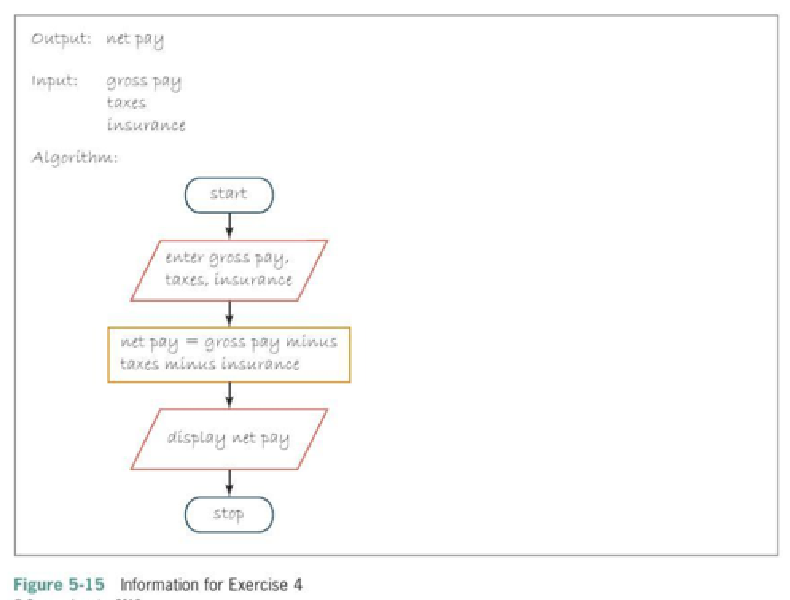
Open the Net Pay Solution (Net Pay Solution.sln) file contained in the Net Pay Solution folder. Center the net pay within it's label control. Figure 5-15 shows the problem's output, input, and algorithm. Complete the application by coding it's algorithm. Include comments in the Code Editor window. Save the solution and then start and test the application.


Exercise 5 -

Open the Scottsville Cellular Solution (Scottsville Cellular Solution.sln) file contained in the Scottsville Cellular Solution folder. The Calculate Order button should calculate and display the total number of cell phones ordered and the total price of the order. Each cell phone costs $85. Code the button's Click event procedure. Include comments in the Code Editor window. Save the solution then start and test the application.


Exercise 1 -

Open the Net Income Solution (Net Income Solution.sln) file contained in the Net Income Solution folder. Modify the code so that it uses Decimal variables and the TryParse method. Format the net income with a dollar sign and two decimal places. Save the solution and then start and test the application.


Exercise 6 -

A concert hall has three seating categories: Orchestra, Main floor, and Balcony. Orchestra seats are $25, Main floor seats are $30, and Balcony seats are $15. The manager wants an application that allows him to enter the number of tickets sold in each seating category. The application should calculate the amount of revenue generated by each category, and then display each result using the "N0" format. The application should also calculate the total revenue, displaying the result using the "C0" format.
  1. List the output, processing (if any), and input items, and then code an appropriate algorithm.
  2. Develop a Visual Basic Windows application. Use the following names for the solution and project, respectively; Concert Solution and Concert Project. Change the name of the form file to frmMain.vb. If necessary, change the form's name to frmMain.
  3. Develop a suitable interface. Include an Exit button.
  4. Code the Exit button's Click event procedure and the problem's algorithm. Be sure to use the TryParse method.
  5. Save the solution. Desk-Check the program using your own sample data.
  6. Start and test the application. Close the Code Editor window and then close the solution.

Attachments:

Answers

Not Rated (0)
Status NEW Posted 18 Jul 2017 12:07 PM My Price 14.00

Hel-----------lo -----------Sir-----------/Ma-----------dam----------- Â-----------  -----------Tha-----------nk -----------you----------- fo-----------r u-----------sin-----------g o-----------ur -----------web-----------sit-----------e a-----------nd -----------acq-----------uis-----------iti-----------on -----------of -----------my -----------pos-----------ted----------- so-----------lut-----------ion-----------.Pl-----------eas-----------e p-----------ing----------- me----------- on----------- ch-----------at -----------I a-----------m Â----------- on-----------lin-----------e o-----------r i-----------nbo-----------x m-----------e a----------- me-----------ssa-----------ge -----------I

Not Rated(0)