SophiaPretty

(5)

$14/per page/Negotiable

About SophiaPretty

Levels Tought:
Elementary,Middle School,High School,College,University,PHD

Expertise:
Accounting,Algebra See all
Accounting,Algebra,Applied Sciences,Architecture and Design,Art & Design,Biology,Business & Finance,Calculus,Chemistry,Communications,Computer Science,Economics,Engineering,English,Environmental science,Essay writing Hide all
Teaching Since: Jul 2017
Last Sign in: 313 Weeks Ago, 6 Days Ago
Questions Answered: 15833
Tutorials Posted: 15827

Education

  • MBA,PHD, Juris Doctor
    Strayer,Devery,Harvard University
    Mar-1995 - Mar-2002

Experience

  • Manager Planning
    WalMart
    Mar-2001 - Feb-2009

Category > Computer Science Posted 20 Nov 2017 My Price 10.00

Microsoft Access to complete the problems

Hello,

Can you help me to solve?


Use SQL in Microsoft Access to complete the problems.


Save all queries as instructed in the problem. Save as database file, .accdb

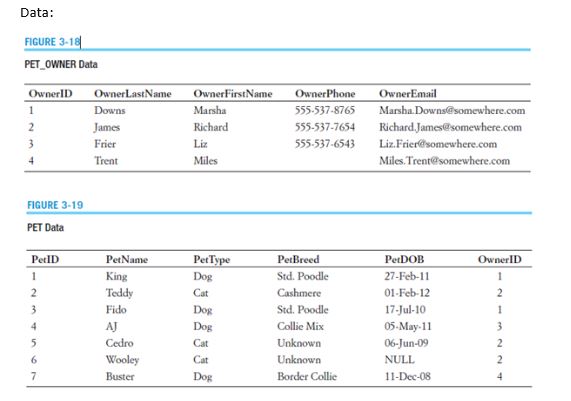
  1. Complete a SQL CREATE TABLE statement to create the PET_OWNER table, with OwnerID as a surrogate key. Save as CreatePetOwner.
  2. Complete a set of SQL INSERT statements to populate the PET_OWNER table with the data given above. Save as PopulatePetOwner.
  3. Complete a SQL CREATE TABLE statement to create the PET table, with PetID as a surrogate key. Save as CreatePet.
  4. Complete a set of SQL INSERT statements to populate the PET table with the data given above. Save as PopulatePet.
  5. Complete aSQL statement to display the breed and type of all pets. Save as AllBreeds.
  6. Complete a SQL statement to display the breed, and DOB of all pets having the type Cat. Save as Cats.
  7. Complete a SQL statement to display the first name, last name, and email of all owners, sorted in alphabetical order by last name. Save as AlphaOwners.
  8. Complete a SQL statement to display all the owners' names, with the first name in all lower case and the last name in all upper case. Save as UpperLower.
  9. Complete a SQL statement to display the total number of pets. Save as TotalPets.
  10. Complete a SQL statement to display the last name, first name and email of any owner who has a NULL value for OwnerPhone. (Note: there should be one owner who has a NULL value for OwnerPhone.) Save as PhoneNull.
  11. Complete a SQL statement to count the number of distinct breeds. Save as NumberOfBreeds.
  12. Complete a SQL statement to display the names of all the dogs. Save as Dogs.


Please see data attached,


Save all queries. Submit the database file in .accdb format


If there are any questions, please let me knowPet Data.JPG


Attachments:

Answers

(5)
Status NEW Posted 20 Nov 2017 07:11 AM My Price 10.00

-----------  ----------- H-----------ell-----------o S-----------ir/-----------Mad-----------am ----------- Th-----------ank----------- yo-----------u f-----------or -----------you-----------r i-----------nte-----------res-----------t a-----------nd -----------buy-----------ing----------- my----------- po-----------ste-----------d s-----------olu-----------tio-----------n. -----------Ple-----------ase----------- pi-----------ng -----------me -----------on -----------cha-----------t I----------- am----------- on-----------lin-----------e o-----------r i-----------nbo-----------x m-----------e a----------- me-----------ssa-----------ge -----------I w-----------ill----------- be----------- qu-----------ick-----------ly

Not Rated(0)