SophiaPretty
$14/per page/Negotiable
Microsoft visual basics 2012 (SDEV 140 - Programming logic and design)
INTRODUCTION: In this session, you will learn all about programming basics: algorithms, variables, comments, data types (integer and floating-point numbers, strings and dates), binary notation, and methods. Create and run the programs in Chapter 3 to understand how they work. For your assignment, you will create and run an exercise from the end of the chapter. You will also help design the DroneDogs order form by assigning names to the controls using Hungarian notation.
DroneDogs project.
PRELIMINARY:
Read Chapter 3 in the textbook. Practice Visual Basic by creating the program Variables in the Try It Out section of Working with Variables in Chapter 3. Create this program from scratch as instructed. Be sure you understand the process of creating, compiling and running a program. You are encouraged to create and run all the programs in this chapter.
ASSIGNMENT PART 1:
The assignment you will turn in is Exercise 1 in the Exercises section of Chapter 3, where you create a Windows application with two button controls, one to perform math on two integer numbers, and one to concatenate two strings. Follow the instructions in the book, with these changes.
Name the project Buttons.
In the Solution Explorer, rename Form1.vb to Buttons.vb (if asked, rename all the items in the project from Form1 to Buttons).
Change the Text property of the form to your name.
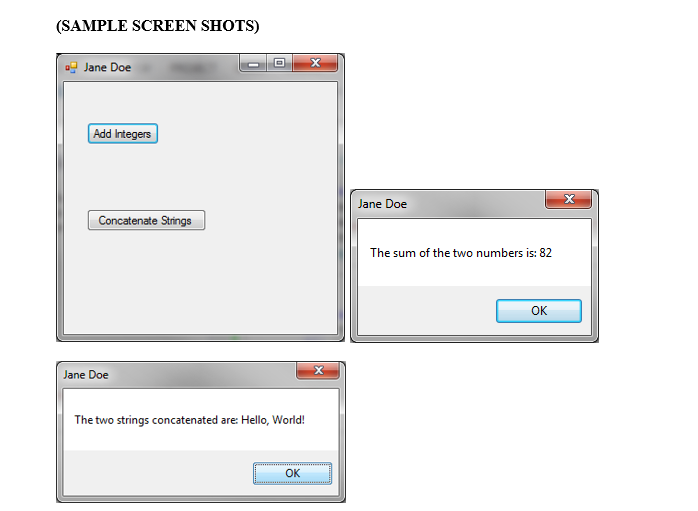
Create the first button. Changes its name to btnAdd and change the Text property to Add Integers. Code the button so that it declares two Integer variables, sets their values to 27 and 55, adds them, and displays them in a message box that says “The sum of the two numbers is: ”, followed by the sum of the numbers. The caption of the message box should be your name (see the second screen shot below).
Make the Text property of the second button Concatenate Strings, and make the button wide enough to display the full text. Code the button so that it declares two String variables, sets their values to “Hello, ”and “World!”, concatenates them, and displays them in a message box that says “The two strings concatenated are: ”, followed by the concatenated string. The caption of the message box should be your name (see the third screen shot below).
When it runs correctly, take a screen shot of the form with the two buttons, and paste it below. Then click the “Add Integers” button, take a screen shot of the addition message box and paste it after the first screen shot. Then click OK to clear the message box, click the “Concatenate Strings” button, take a screen shot of the concatenation message box and paste it after the second screen shot.
(SAMPLE SCREEN SHOTS)
(PASTE YOUR SCREEN SHOTS HERE: Yours will look like the ones above, but with your name in the captions)