
SophiaPretty

(5)

$14/per page/Negotiable

About SophiaPretty

Levels Tought:
Elementary,Middle School,High School,College,University,PHD

Expertise:
Accounting,Algebra See all
Accounting,Algebra,Applied Sciences,Architecture and Design,Art & Design,Biology,Business & Finance,Calculus,Chemistry,Communications,Computer Science,Economics,Engineering,English,Environmental science,Essay writing Hide all
Teaching Since: Jul 2017
Last Sign in: 304 Weeks Ago, 2 Days Ago
Questions Answered: 15833
Tutorials Posted: 15827

Education

  • MBA,PHD, Juris Doctor
    Strayer,Devery,Harvard University
    Mar-1995 - Mar-2002

Experience

  • Manager Planning
    WalMart
    Mar-2001 - Feb-2009

Category > Computer Science Posted 05 Jan 2018 My Price 10.00

enhance the stopwatch module from extra exercise

JavaScript
*Must use code attached*
Enhance the Clock app’s stopwatch


In this exercise, you’ll enhance the stopwatch module from extra exercise 15-1 to calculate the elapsed hours, and you’ll change the Clock application to show the elapsed hours. The enhanced application looks like this: (Example.png)


  1. Open the HTML and JavaScript files:

Notice that there’s a new library file named library_stopwatch_augment.js. In the HTML file, note that the script tag for this new library comes after the script tag for the stopwatch library. Also note that there’s a new span tag for the hours value of the stopwatch with a default value of “00”.
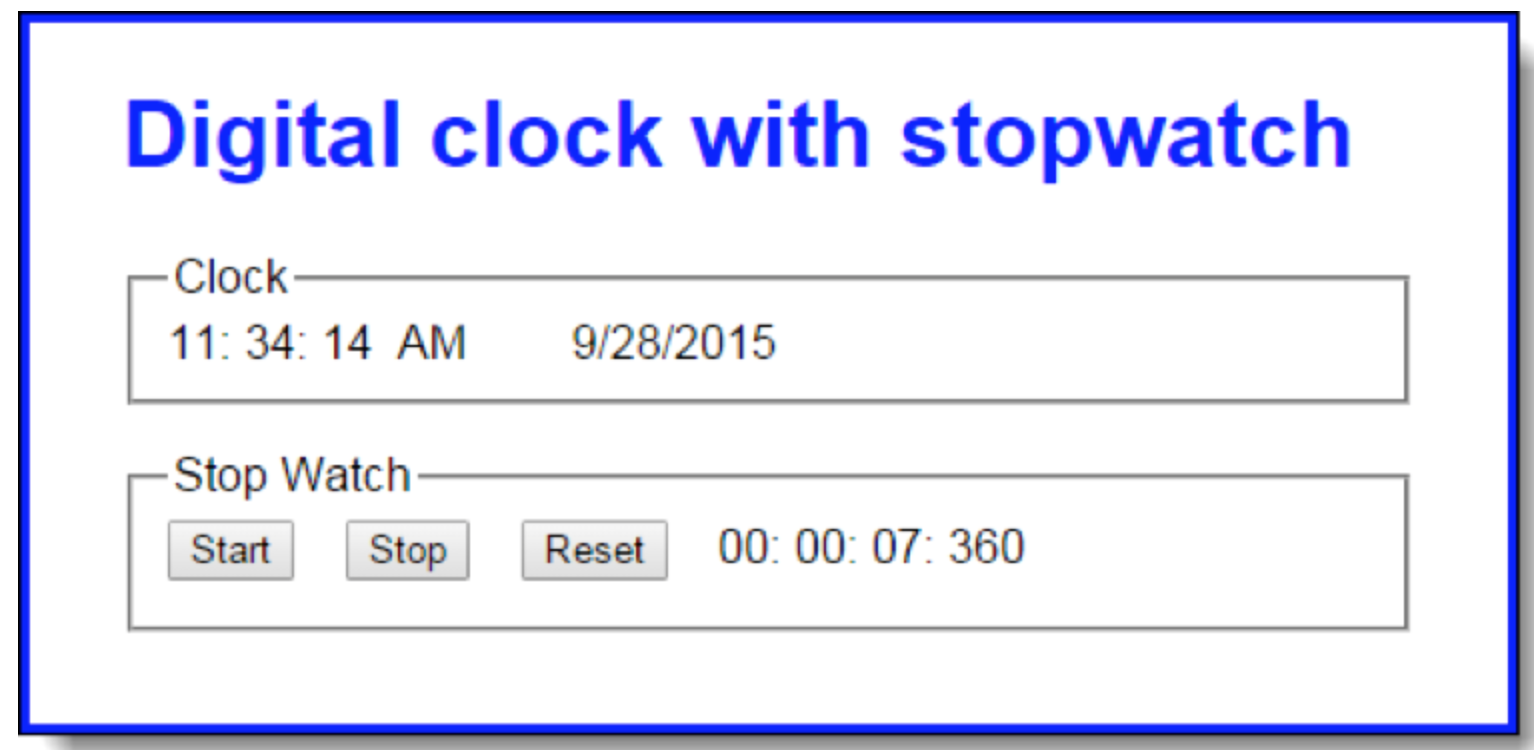
  1. Change the library_stopwatch.js file so the module object has a read-only property that exposes the values of the private elapsed object. NOTE: Because elapsed is an object, if you return it directly, its properties can be changed even if the property that returns it is non-configurable. Thus, you’ll need to return an object that contains copies of the values in the elapsed object’s properties.
  2. In the library_stopwatch_augment.js file, add code that augments the stopwatch module by adding a method named getElapsedTimeWithHours. Within this new method, get the object from the read-only property from step 2, add an hours property to it, calculate the number of elapsed hours, adjust the number of elapsed minutes, and return the adjusted object.
  3. Change the code in the clock.js file so the displayTick callback function uses the getElapsedTimeWithHours function from step 3 to display the hours in the s_hours span tag. Be sure to reset this span tag in the resetStopwatch callback function.

Attachments:

Answers

(5)
Status NEW Posted 05 Jan 2018 12:01 PM My Price 10.00

-----------  ----------- H-----------ell-----------o S-----------ir/-----------Mad-----------am ----------- Th-----------ank----------- yo-----------u f-----------or -----------you-----------r i-----------nte-----------res-----------t a-----------nd -----------buy-----------ing----------- my----------- po-----------ste-----------d s-----------olu-----------tio-----------n. -----------Ple-----------ase----------- pi-----------ng -----------me -----------on -----------cha-----------t I----------- am----------- on-----------lin-----------e o-----------r i-----------nbo-----------x m-----------e a----------- me-----------ssa-----------ge -----------I w-----------ill----------- be----------- qu-----------ick-----------ly

Not Rated(0)