Accounting,Algebra,Applied Sciences,Architecture and Design,Art & Design,Biology,Business & Finance,Calculus,Chemistry,Communications,Computer Science,Economics,Engineering,English,Environmental science,Essay writing Hide all
Teaching Since:
Jul 2017
Last Sign in:
339 Weeks Ago, 6 Days Ago
Questions Answered:
15833
Tutorials Posted:
15827
Education
MBA,PHD, Juris Doctor
Strayer,Devery,Harvard University Mar-1995 - Mar-2002
Experience
Manager Planning
WalMart Mar-2001 - Feb-2009
Category > Computer SciencePosted 06 Jan 2018My Price10.00
Benefits4 database found in Doc Sharing_Benefits.
totally lost on this Microsoft access assignment, need help doing forms and etc....
Week 11 - Assignment
ABC Inc.'s Health Benefits
Read the entire assignment found in your book on page 180..
Download and save the Benefits4 database found in Doc Sharing. Save as LastName_Benefits.
All your data is already included in the database and the relationships have been set up. Be sure and review the data and the relationships. Therefore, you do not have to create tables nor populate them with data. Double Check your relationships for referential integrity.
Use the employee table to build the Employee Insurance Enrollment form. Use the Form Wizard to complete this form. Create a select query based on the appropriate table to build the subform. In design view, drag and drop the subform onto the main form. You will need a total of the insurance premium from the subform on the main form. For how, view here: Calculated Field from Subform.
Create the mail merge letter. For how, view here: Mail Merge
Create the query for the Employee by Insurance report. Use the report wizard and view the data by company.
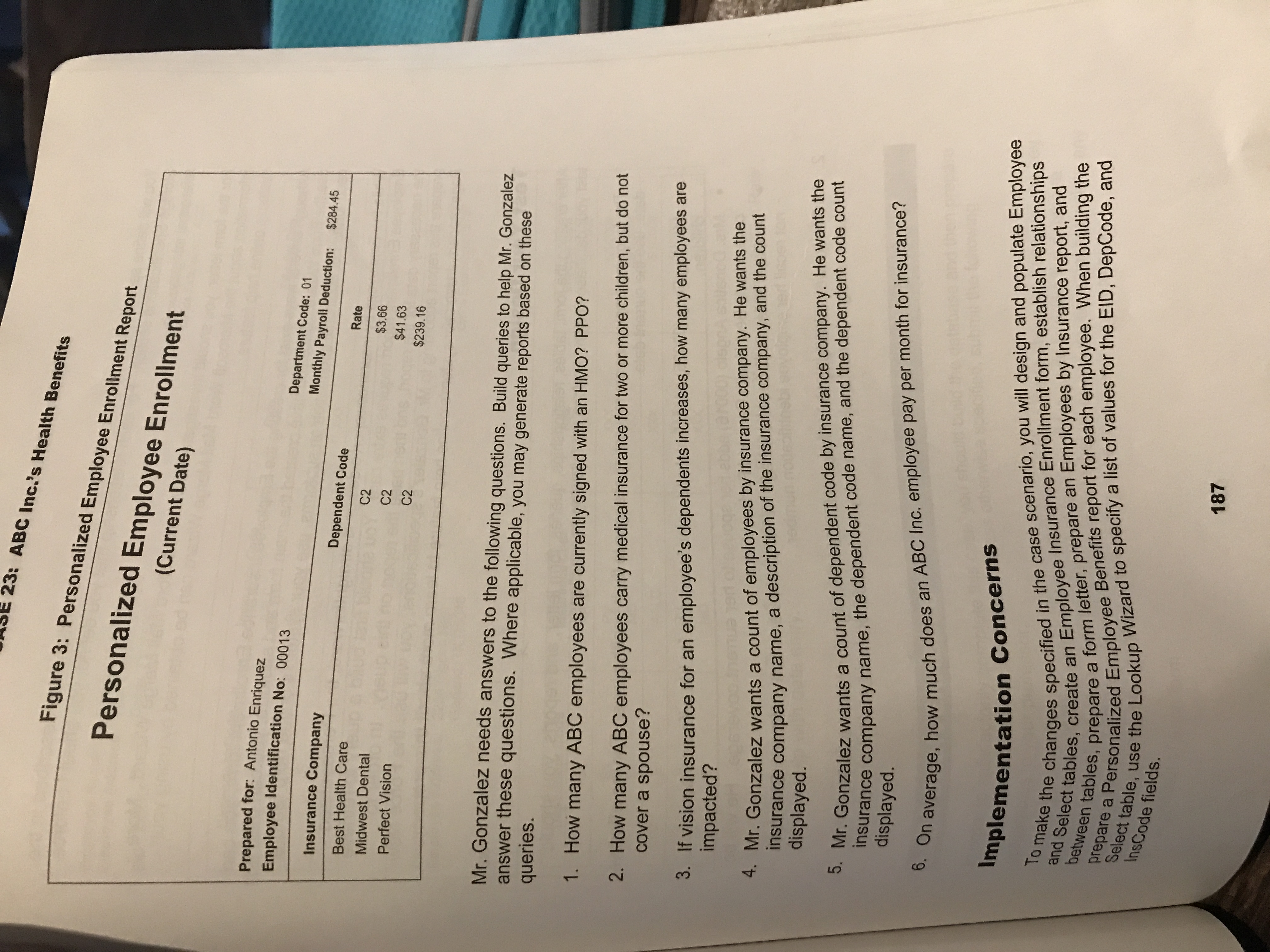
Create the query for the Personalized Employee Enrollment report. Select controls on the Design tab and find the page break control. Place it in the page footer. You will be able to see the results in Print Preview mode.
Queries on page 187:
The criteria line for the first query is : Like "*HMO*" Or Like "*PPO*". Also, Dep. Code should be E for employee.
The next query will require criteria for C2.
The next query will require a query within a query. The first query will require a criteria of PV and Dep code <> e and counts employee code. Save this query. Using this query, create a new one that sums the count of EID.
Create a query that counts the employee's by insurance company. You will count the EID and Group by the other fields, sorting by Insurance code.
Create a query that counts the dependent codes by insurance company.
Create a query that sums the employee rates paid. Then with this query, create another query that averages that sum.
You do not need to do the test your design steps. Upload the database to the Benefits drop box.