APlusGrades

Not Rated (0)

$15/per page/Negotiable

About APlusGrades

Levels Tought:
Elementary,Middle School,High School,College,University,PHD

Expertise:
Accounting,Algebra See all
Accounting,Algebra,Applied Sciences,Architecture and Design,Art & Design,Biology,Business & Finance,Calculus,Chemistry,Communications,Computer Science,Economics,Engineering,English,Environmental science,Essay writing,Foreign Languages,Geography,Geology,Health & Medical,HR Management,Law,Management,Physics,Programming,Science,Statistics Hide all
Teaching Since: Jul 2017
Last Sign in: 364 Weeks Ago, 6 Days Ago
Questions Answered: 1850
Tutorials Posted: 1850

Education

  • Graduate in Biology and Nutrition, MBA Finance
    Florida State University
    Aug-2000 - Jul-2007

Experience

  • Ass. Relationship Manager
    Penn-Florida
    Mar-2009 - Feb-2016

Category > Computer Science Posted 21 Jul 2017 My Price 12.00

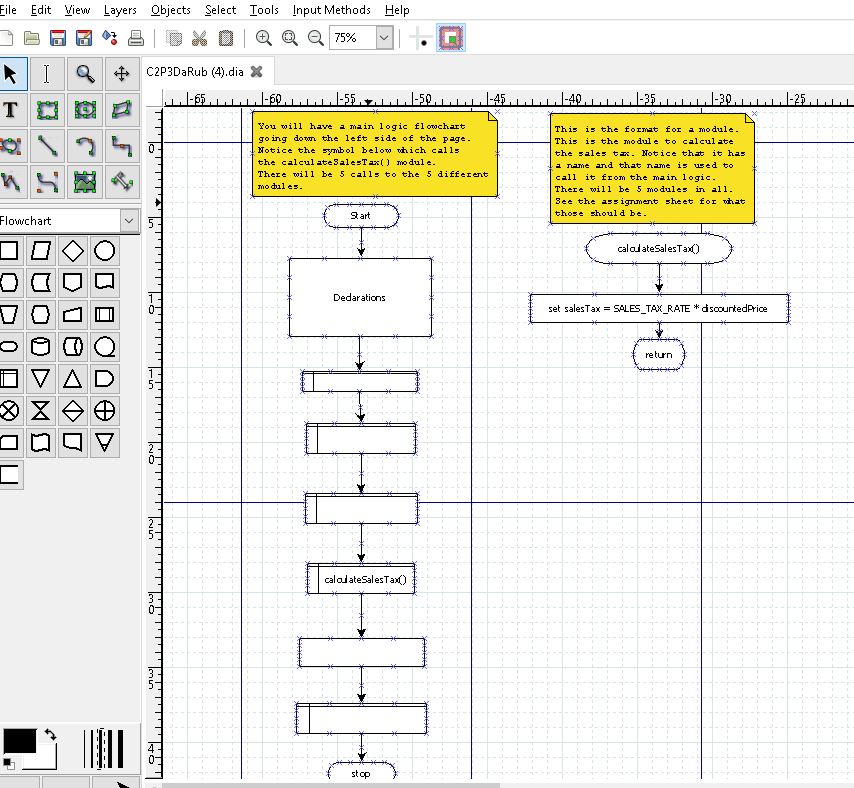
Create a flowchart

Description: Create a flowchart that will contain five modules, one to prompt the user to input the sales amount before discount andthe discount percent as a decimal, the second to calculate the amount of discount, the the third to calculate the purchase amount less the discount, the forth to calculate the sales tax on the net sale amount (sound familiar?), and the fifth to handle all of the output. See the output box below for what that should look like.
Declare your variables by type: num or string in a Declarations symbol. Show your input prompts and output labels in quotes.

  Every variable name you use in your flowchart will need to be declared at the beginning of the program logic in a processing symbol with the label "Declarations:".
Look through your logic when you are finished and see if you have used any variable name that has not been declared.
If a variable is used only in a module, you may declare it in the module in the same way you would in the main logic.
  Assumption #1The sales tax amount is a constant in the program and does not need to be input. Just use a literal 0.06 in your calculation, or, you may declare a variable that is a constant and then use the variable in the calculation.
  Assumption #2To make it simple, prompt the user for the discount percent as a decimal. Assume that the user has entered say .30 for 30%, and that it is in that form when you use it in your calculation.


1.3. Specific Problem Requirements Summary

  You do not have to do the pseudocode for this problem, just the flowchart.
  • Declare all of your variables in a "Declarations" symbol (processing symbol).
  • Use camel casing for variable names, and use descriptive variable names. This time I will take points off for variable names like "tax" or "total."
  • Name your module with camel casing and use that name to call the module. The header to the module will have exactly the same name (see the example on page 57). Use the predefined process symbol for the module call symbol.
    • Give your modules a meaningful names. Do not use something like "tax." Does that stand for: state tax, income tax, or some other tax?
  • Label all output according to the Output Format section below.
  • Create five modules:
    • (1) Prompt the user to input for the sales amount and the percentage amount of the discount.
    • (2) Calculate the amount of the discount.
    • (3) Calculate the purchase amount less the discount.
    • (4) Calculate the sales tax on the sales amount after discount.
    • (5) Handle all of the output of the results (see below).
  • Output:
    • The original sales amount
    • The discount percentage
    • The amount of the discount
    • The net sales amount after discount
    • The sales tax amount
    • The final sales price after discount and the sales tax have been applied.

Attachments:

Answers

Not Rated (0)
Status NEW Posted 21 Jul 2017 04:07 PM My Price 12.00

Hel-----------lo -----------Sir-----------/Ma-----------dam----------- Â-----------  -----------Tha-----------nk -----------you----------- fo-----------r u-----------sin-----------g o-----------ur -----------web-----------sit-----------e a-----------nd -----------acq-----------uis-----------iti-----------on -----------of -----------my -----------pos-----------ted----------- so-----------lut-----------ion-----------.Pl-----------eas-----------e p-----------ing----------- me----------- on----------- ch-----------at -----------I a-----------m Â----------- on-----------lin-----------e o-----------r i-----------nbo-----------x m-----------e a----------- me-----------ssa-----------ge -----------I

Not Rated(0)